
|
Getting your Trinity Audio player ready...
|
In real-world data analysis, we often need answers like:
- What is the top-selling product in each city?
- What is the running total of sales over time?
- What is the rank of each salesperson?
- What is the previous month’s sales compared to current sales?
Using normal SQL queries with GROUP BY often removes the row-level detail.
This is where Window Functions become extremely useful.
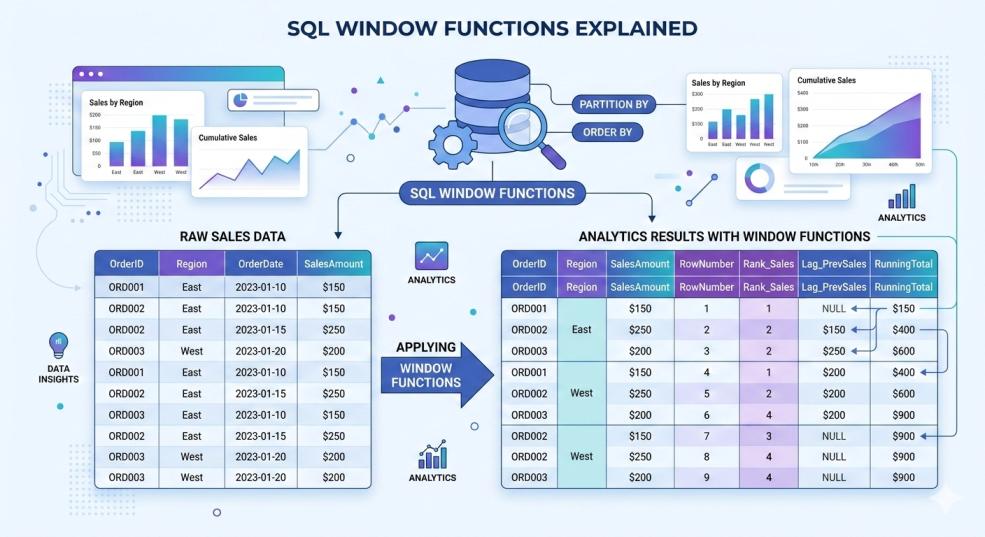
Window functions allow you to perform calculations across a set of rows while still keeping individual rows in the result.
They are widely used in:
- Business analytics
- MIS reporting
- Financial dashboards
- Data science
- Power BI / Tableau datasets
Both PostgreSQL and MySQL (8.0+) support window functions.
What is a Window Function?
A Window Function performs a calculation across a group of rows called a window.
Unlike GROUP BY, it does not collapse rows.
Instead, it adds additional calculated columns.
Example result:
| sale_id | customer_id | sale_amount | total_sales |
|---|---|---|---|
| 1 | 101 | 500 | 2500 |
| 2 | 101 | 1000 | 2500 |
| 3 | 101 | 1000 | 2500 |
The total is calculated for all rows, but each row remains visible.
Read More: GROUP BY in SQL
Basic Syntax of Window Functions
FUNCTION_NAME() OVER (
    PARTITION BY column
    ORDER BY column
)Explanation:
FUNCTION_NAME()
The calculation (SUM, AVG, ROW_NUMBER, etc.)
OVER()
Defines the window.
PARTITION BY
Groups rows similar to GROUP BY.
ORDER BY
Defines the order for calculation.
FMCG Dataset Used in Examples
Tables used:
customers
| customer_id | customer_name | city |
products
| product_id | product_name | category | price |
employees
| employee_id | employee_name | city |
sales
| sale_id | sale_date | product_id | customer_id | employee_id | quantity | sale_amount |
1. ROW_NUMBER()
ROW_NUMBER() assigns a unique sequential number to each row.
Example: Number every sale
SELECT
    sale_id,
    sale_date,
    sale_amount,
    ROW_NUMBER() OVER (ORDER BY sale_date) AS row_num
FROM sales;Result:
| sale_id | sale_date | sale_amount | row_num |
|---|---|---|---|
| 1 | 2024-01-01 | 500 | 1 |
| 2 | 2024-01-02 | 1000 | 2 |
| 3 | 2024-01-03 | 700 | 3 |
2. PARTITION BY (Most Important Concept)
Partition divides the dataset into groups.
Example: Sales row number per customer
SELECT
    customer_id,
    sale_id,
    sale_amount,
    ROW_NUMBER() OVER (
        PARTITION BY customer_id
        ORDER BY sale_date
    ) AS purchase_number
FROM sales;Now numbering restarts for each customer.
| customer_id | sale_id | purchase_number |
|---|---|---|
| 101 | 1 | 1 |
| 101 | 2 | 2 |
| 102 | 3 | 1 |
| 102 | 4 | 2 |
3. RANK()
Ranks rows based on value.
Example: Rank sales by amount
SELECT
    sale_id,
    sale_amount,
    RANK() OVER (ORDER BY sale_amount DESC) AS sales_rank
FROM sales;Result example:
| sale_amount | rank |
|---|---|
| 5000 | 1 |
| 4000 | 2 |
| 4000 | 2 |
| 3000 | 4 |
Notice ranking skips numbers after ties.
4. DENSE_RANK()
Similar to RANK() but no gaps in ranking.
SELECT
    sale_amount,
    DENSE_RANK() OVER (ORDER BY sale_amount DESC) AS rank_dense
FROM sales;Result:
| sale_amount | dense_rank |
|---|---|
| 5000 | 1 |
| 4000 | 2 |
| 4000 | 2 |
| 3000 | 3 |
RANK vs DENSE_RANK
| Function | Gap After Tie |
|---|---|
| RANK | Yes |
| DENSE_RANK | No |
Example use:
- RANK → competition ranking
- DENSE_RANK → category ranking
5. SUM() Window Function
Calculate totals without removing rows.
Example: Total sales per customer
SELECT
    customer_id,
    sale_id,
    sale_amount,
    SUM(sale_amount) OVER (
        PARTITION BY customer_id
    ) AS total_customer_sales
FROM sales;Result:
| customer_id | sale_amount | total_customer_sales |
|---|---|---|
| 101 | 500 | 2500 |
| 101 | 1000 | 2500 |
| 101 | 1000 | 2500 |
Also Read: Aggregate Functions in SQL
6. Running Total (Cumulative Sales)
Extremely common in business reporting.
Example: Daily cumulative sales
SELECT
    sale_date,
    sale_amount,
    SUM(sale_amount) OVER (
        ORDER BY sale_date
    ) AS running_total
FROM sales;Example result:
| sale_date | sale_amount | running_total |
|---|---|---|
| Jan 1 | 500 | 500 |
| Jan 2 | 1000 | 1500 |
| Jan 3 | 700 | 2200 |
7. AVG() Window Function
Calculate average without grouping rows.
Example: Average sales per employee
SELECT
    employee_id,
    sale_amount,
    AVG(sale_amount) OVER (
        PARTITION BY employee_id
    ) AS avg_employee_sales
FROM sales;8. COUNT() Window Function
Count rows while preserving row-level data.
Example: Transactions per customer
SELECT
    customer_id,
    sale_id,
    COUNT(*) OVER (
        PARTITION BY customer_id
    ) AS total_transactions
FROM sales;9. LAG()
Access previous row values.
Extremely useful for comparison reports.
Example: Compare current sale with previous sale
SELECT
    sale_date,
    sale_amount,
    LAG(sale_amount) OVER (
        ORDER BY sale_date
    ) AS previous_sale
FROM sales;Example:
| sale_date | sale_amount | previous_sale |
|---|---|---|
| Jan 1 | 500 | NULL |
| Jan 2 | 1000 | 500 |
| Jan 3 | 700 | 1000 |
10. LEAD()
Opposite of LAG().
Shows next row value.
SELECT
    sale_date,
    sale_amount,
    LEAD(sale_amount) OVER (
        ORDER BY sale_date
    ) AS next_sale
FROM sales;Example:
| sale_date | sale_amount | next_sale |
|---|---|---|
| Jan 1 | 500 | 1000 |
| Jan 2 | 1000 | 700 |
| Jan 3 | 700 | NULL |
11. FIRST_VALUE()
Returns first value in the partition.
Example: First sale amount per customer
SELECT
    customer_id,
    sale_date,
    sale_amount,
    FIRST_VALUE(sale_amount) OVER (
        PARTITION BY customer_id
        ORDER BY sale_date
    ) AS first_purchase
FROM sales;12. LAST_VALUE()
Returns last value in the partition.
SELECT
    customer_id,
    sale_date,
    sale_amount,
    LAST_VALUE(sale_amount) OVER (
        PARTITION BY customer_id
        ORDER BY sale_date
        ROWS BETWEEN UNBOUNDED PRECEDING AND UNBOUNDED FOLLOWING
    ) AS last_purchase
FROM sales;Window Frame Concept
Sometimes we control which rows are included in the window.
Example:
ROWS BETWEEN UNBOUNDED PRECEDING AND CURRENT ROWMeaning:
Calculate from start of partition to current row.
Example running total:
SUM(sale_amount) OVER (
ORDER BY sale_date
ROWS BETWEEN UNBOUNDED PRECEDING AND CURRENT ROW
)Real FMCG Business Example
Top selling product in each category
SELECT *
FROM (
    SELECT
        p.category,
        p.product_name,
        SUM(s.sale_amount) AS total_sales,
        RANK() OVER (
            PARTITION BY p.category
            ORDER BY SUM(s.sale_amount) DESC
        ) AS rank_in_category
    FROM sales s
    JOIN products p
    ON s.product_id = p.product_id
    GROUP BY p.category, p.product_name
) ranked_products
WHERE rank_in_category = 1;This finds best product per category.
Salesperson Ranking Report
SELECT
    e.employee_name,
    SUM(s.sale_amount) AS total_sales,
    RANK() OVER (
        ORDER BY SUM(s.sale_amount) DESC
    ) AS sales_rank
FROM sales s
JOIN employees e
ON s.employee_id = e.employee_id
GROUP BY e.employee_name;Used in sales performance dashboards.
Monthly Sales Growth Analysis
SELECT
    sale_month,
    monthly_sales,
    LAG(monthly_sales) OVER (
        ORDER BY sale_month
    ) AS previous_month_sales
FROM (
    SELECT
        DATE_TRUNC('month', sale_date) AS sale_month,
        SUM(sale_amount) AS monthly_sales
    FROM sales
    GROUP BY sale_month
) monthly_data;Used in financial reporting.
PostgreSQL vs MySQL Support
| Feature | PostgreSQL | MySQL |
|---|---|---|
| ROW_NUMBER | Yes | Yes |
| RANK | Yes | Yes |
| DENSE_RANK | Yes | Yes |
| LAG / LEAD | Yes | Yes |
| Window Frames | Advanced | Supported |
| Version requirement | All modern versions | MySQL 8.0+ |
Older MySQL versions do not support window functions.
Window Functions vs GROUP BY
| Feature | Window Function | GROUP BY |
|---|---|---|
| Keeps row-level data | Yes | No |
| Used for ranking | Yes | No |
| Used for running totals | Yes | No |
| Aggregation only | No | Yes |
Read More: GROUP BY in SQL
Common Interview Questions
1️⃣ Difference between RANK and DENSE_RANK
2️⃣ What is PARTITION BY
3️⃣ Difference between LAG and LEAD
4️⃣ How to calculate running totals
5️⃣ Window vs GROUP BY
These are very common Data Analyst interview questions.
When Should You Use Window Functions?
Use them for:
- Ranking reports
- Running totals
- Growth comparison
- Customer purchase sequence
- Salesperson ranking
- Financial analytics
- Dashboard metrics
Avoid them when:
- Simple aggregation is enough
- Dataset is extremely large without indexing
How Companies Use Window Functions
Typical analytics pipeline:
Raw Data → Cleaning → Window Functions → Dashboard
Example:
Sales table →
Ranking →
Top product report →
Power BI dashboard.
Final Summary
Window Functions in SQL allow calculations across related rows while keeping individual row-level data intact. Unlike GROUP BY, they do not collapse rows, making them ideal for ranking, running totals, comparisons, and advanced analytics. Functions such as ROW_NUMBER, RANK, DENSE_RANK, SUM, AVG, LAG, and LEAD are widely used in data analysis, financial reporting, and business dashboards.
Both PostgreSQL and MySQL (8.0+) support window functions, making them essential for modern SQL-based analytics workflows. Mastering window functions enables analysts to build powerful insights, ranking systems, and trend analysis directly within SQL queries.